Physical Address
304 North Cardinal St.
Dorchester Center, MA 02124
Physical Address
304 North Cardinal St.
Dorchester Center, MA 02124

Your Guide to the Latest in Tech
Your Guide to the Latest in Tech

Ruminesia – Have you ever looked at a new iPhone and wondered whether the upgrade really changes the everyday experience? At first glance, the iPhone 15 may look familiar, but several updates actually make daily use feel more practical and convenient.
The biggest highlights in the iPhone 15 specifications include the new USB-C port, a brighter display, Dynamic Island, and an upgraded 48 MP camera. Interestingly, many of these improvements are not just about performance, but about making photography, charging, and multitasking feel smoother in real life.
At the same time, the arrival of the iPhone 16 has made many users compare which model is worth buying today. Some prefer the larger screen and battery life of the iPhone 15 Plus, while others want the newer performance and hardware features of the iPhone 16.
Key Highlights
- The iPhone 15 finally adopts USB-C, making charging simpler across multiple Apple devices.
- The 48 MP camera improves photo detail and enables practical 2x optical-quality zoom.
- Dynamic Island makes notifications and multitasking feel more interactive during everyday use.
- The A16 Bionic chip still delivers smooth gaming, editing, and long-term daily performance.
- iPhone 15 Plus suits users prioritizing battery life and a larger entertainment-focused display.
- iPhone 16 feels more future-ready with faster performance and newer hardware controls.
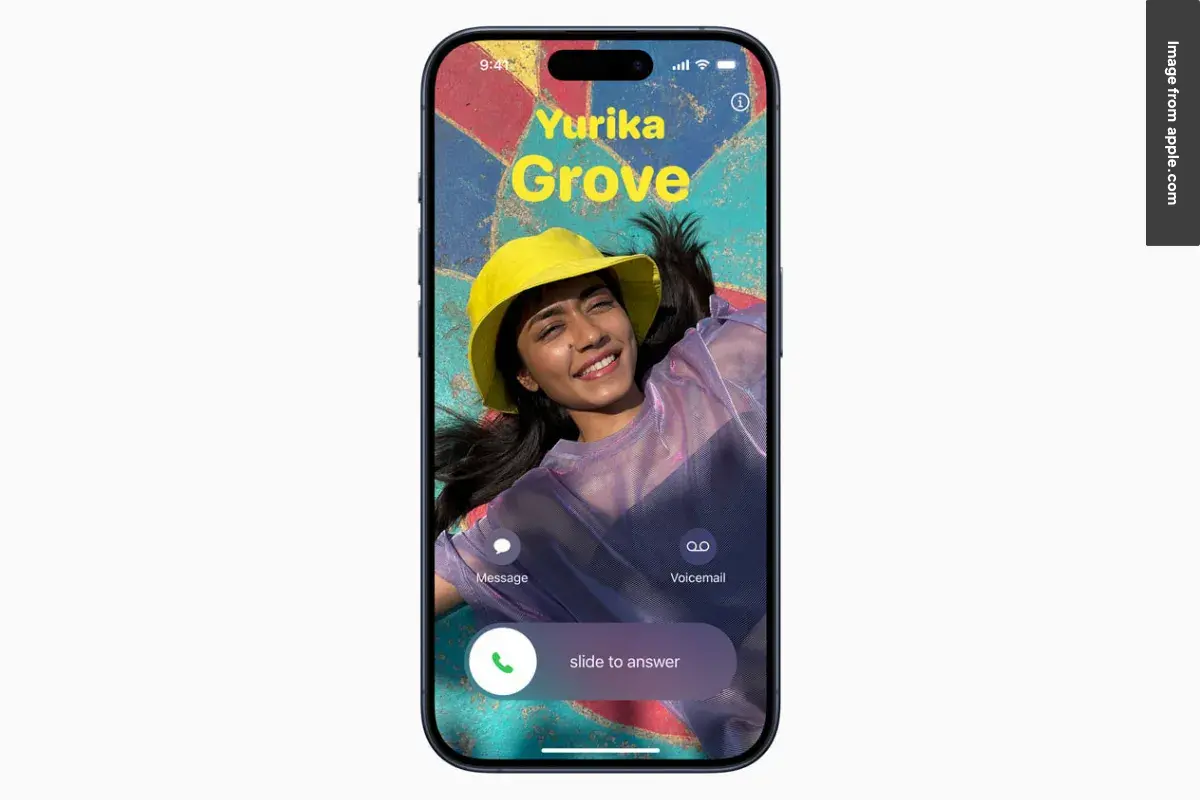
The iPhone 15 comes with several practical upgrades, including the Dynamic Island design, a new 48 MP main camera, and the long-awaited USB-C port. Besides looking more modern, these changes also improve everyday usability for photography, charging, and multitasking.
| Category | Specifications |
|---|---|
| Design & Build | Aluminum frame, color-infused glass back, Ceramic Shield front, IP68 water and dust resistance |
| Display | 6.1-inch Super Retina XDR OLED, 2556 × 1179 resolution, 460 ppi, HDR10, Dolby Vision, 2,000 nits peak brightness |
| Refresh Rate | 60 Hz |
| Processor | Apple A16 Bionic chip (4nm) |
| RAM | 6 GB |
| Storage Options | 128 GB, 256 GB, 512 GB |
| Operating System | iOS |
| Main Camera | 48 MP, ƒ/1.6 aperture, sensor-shift OIS, 2x optical-quality zoom |
| Ultra-Wide Camera | 12 MP, ƒ/2.4 aperture, 120° field of view |
| Rear Video Recording | 4K video up to 60 fps, Cinematic Mode up to 4K HDR 30 fps |
| Front Camera | 12 MP TrueDepth camera with autofocus |
| Front Video Recording | 4K video up to 60 fps, Cinematic Mode support |
| Battery Capacity | 3349 mAh |
| Charging | USB-C charging, 15W MagSafe wireless charging, reverse wired charging |
| Fast Charging | Up to 50% in around 30 minutes |
| Connectivity | 5G, Wi-Fi 6, Bluetooth 5.3, NFC, Ultra Wideband |
| Security | Face ID facial recognition |
| Safety Features | Crash Detection, Emergency SOS via satellite |
| SIM Configuration | Dual eSIM (US), Nano-SIM + eSIM (international), Dual Nano-SIM (China) |
| Available Colors | Black, Blue, Green, Yellow, Pink |
Apple keeps the iPhone 15 looking clean and premium with an aluminum frame, color-infused glass back, and Ceramic Shield protection on the front. It also carries an IP68 rating, meaning it can handle dust, splashes, and even accidental water exposure up to 6 meters for 30 minutes.
On the front, the device uses a 6.1-inch Super Retina XDR OLED display with a sharp 2556 x 1179 resolution at 460 ppi. The screen supports HDR10 and Dolby Vision, while peak outdoor brightness reaches 2,000 nits. In practice, this makes the display much easier to see under direct sunlight compared to older iPhone models.
Performance is powered by Apple’s A16 Bionic chip, the same processor previously used in the iPhone 14 Pro series. Paired with 6 GB of RAM, the phone handles gaming, multitasking, and video editing smoothly without feeling overly aggressive on battery usage.
Storage options include 128 GB, 256 GB, and 512 GB, although there’s no microSD expansion support.
One of the biggest highlights in the iPhone 15 specifications is the upgraded 48 MP main camera. What many users don’t realize is that the higher resolution also enables a 2x optical-quality zoom without adding a dedicated telephoto lens. The dual rear camera setup includes:
For video, the iPhone 15 supports 4K recording up to 60 fps and Cinematic mode in 4K HDR at 30 fps. Interestingly, Apple continues to focus heavily on video consistency, which is one reason many creators still prefer iPhones for content production.
On the front, the 12 MP TrueDepth camera supports autofocus and 4K video recording up to 60 fps, making selfies and video calls noticeably sharper.
The iPhone 15 is equipped with a 3349 mAh battery and now uses a USB-C port instead of Lightning. Besides simplifying charging, this change also makes it easier for users who already own USB-C accessories for iPads, Macs, or Android devices. Charging features include:
For connectivity, the phone supports 5G, Wi-Fi 6, Bluetooth 5.3, NFC, and Apple’s second-generation Ultra Wideband chip for more precise location tracking.
Security still relies on Face ID, while additional features include Crash Detection and Emergency SOS via satellite. These additions may not be used every day, but in emergencies, they can become surprisingly important.
When comparing the iPhone 15 Plus and iPhone 16, the biggest differences come down to display size, battery life, performance, and newer hardware features. Both phones are powerful, but they target slightly different types of users in everyday use.
| Feature | iPhone 15 Plus | iPhone 16 |
|---|---|---|
| Display Size | 6.7-inch display | 6.1-inch display |
| Processor | A16 Bionic chip | A18 chip |
| RAM | 6 GB | 8 GB |
| Battery Focus | Larger battery capacity | More power-efficient chipset |
| Phone Size | Bigger and wider body | More compact and lighter |
| Performance | Excellent for daily use and gaming | Faster multitasking and future-ready performance |
| Special Features | Large screen experience | Action Button and Camera Control |
| Best For | Media consumption and battery life | Performance and newer hardware features |
Read More:
The iPhone 15 introduced several meaningful upgrades, including USB-C charging, the Dynamic Island, and a better camera system. Below are some of the most frequently asked questions about the iPhone 15 that users commonly search for before buying.
Yes, all iPhone 15 models now use a USB-C port instead of Lightning. This makes charging more convenient because you can use the same cable for devices like MacBooks, iPads, and newer AirPods.
For many users, yes. The iPhone 15 adds Dynamic Island, a 48 MP camera, USB-C, and the A16 Bionic chip, making the overall experience feel noticeably more modern and practical.
The iPhone 15 can comfortably last a full day with normal to heavy use. Apple also claims up to 20 hours of video playback on a single charge.
The iPhone 15 is water-resistant, not fully waterproof. It has an IP68 rating, which means it can survive splashes, rain, and short water exposure under certain conditions.
No, iPhone 15 models sold in the United States only support eSIM. Physical SIM card trays are no longer included on US variants.
The main difference is performance and premium features. The iPhone 15 Pro uses a titanium body, A17 Pro chip, 120Hz ProMotion display, and a more advanced camera system.
Yes, the iPhone 15 supports Emergency SOS via satellite. This feature helps users contact emergency services even without cellular or Wi-Fi coverage.
The iPhone 15 comes in 128GB, 256GB, and 512GB storage variants. Since storage cannot be upgraded later, choosing the right capacity is important.
Dynamic Island is an interactive display area at the top of the screen that shows notifications, music controls, timers, calls, and live activities in real time.
No, Apple does not include a charging brick with the iPhone 15. The box only includes the phone and a USB-C charging cable.
The iPhone 15 feels like one of those updates that focuses less on flashy changes and more on improving the everyday experience. Features like USB-C, the brighter display, and the upgraded camera may sound simple on paper, but they become much more noticeable during daily use. Interestingly, that practicality is exactly what makes the phone feel more refined over time.
At the same time, choosing between the iPhone 15 Plus and iPhone 16 really depends on how you use your phone. Some people value longer battery life and a larger screen, while others prefer faster performance and newer controls. In practice, there’s no single “best” choice — only the one that fits your routine better.
What many users realize after upgrading is that comfort and convenience often matter more than raw specifications. Sometimes the small improvements are the ones you end up appreciating the most after months of use. Which feature matters most to you when choosing a new iPhone?